


Skip to content
Auriga accounting
Edit Content
auriga accounting
AURIGA ACCOUNTING PRIVATE LIMITED Untitled 1200 x 630 px 2

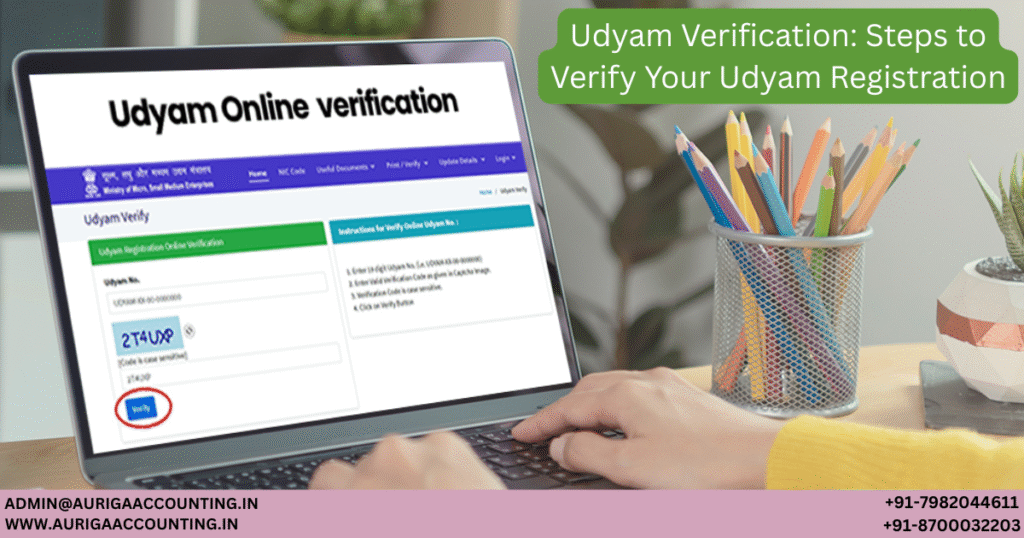
Udyam Verification is the process of checking the status of your business’s Udyam Registration. It helps validate the authenticity of your MSME/Udyam registration and ensures your enterprise is officially registered. You can verify your registration online through the official Udyam Registration portal. Simply enter your 19-digit Udyam Registration or Reference Number along with the Captcha code, then click ‘Verify’. The portal will display your registration details, including your Udyam registration number and the name of your enterprise, confirming whether your registration is active.

This article provides complete guidance on the documents required and a step-by-step process for Udyam Verification. If you are facing difficulties with Udyam Registration, Auriga Accounting pvt. ltd. can simplify the process and make it effortless!

What is Udyam Registration?

Udyam Registration is a government registration process in India, introduced in 2020 by the Ministry of Micro, Small, and Medium Enterprises (MSME). It replaced the earlier Udyog Aadhaar system and aims to simplify registration for micro, small, and medium-sized enterprises (MSMEs). Registered MSMEs gain access to various government benefits, support, and incentives. Upon registration, businesses receive a unique Udyam Registration Number (URN). The registration is valid for a lifetime and does not require renewal.

Why Verify Your Udyam Registration?

Verifying your Udyam registration status or URN is important for several reasons:

1. Validity Check

Verification confirms that your Udyam Registration is active, ensuring legal assurance for your business operations.

2. Government Compliance

Udyam Registration is mandatory for MSMEs in India. Checking your registration ensures compliance with government regulations, which is essential to access various schemes and benefits.

3. Access to Benefits

Registered MSMEs can avail of subsidies, low-interest loans, incentives, and preferential treatment in government procurement. Verification ensures your continued eligibility for these benefits.

4. Transparency and Credibility

Verifying your registration adds credibility, assuring customers, suppliers, and business partners of your compliance and legitimacy.

5. Avoid Penalties

Non-compliance can lead to penalties or loss of benefits. Verification ensures uninterrupted access to schemes and avoids legal complications.

How to Check Udyam Registration Status

Follow these steps to verify your Udyam registration:

  1. Visit the official Udyam Registration portal.

  2. Go to the ‘Print/Verify’ section and click ‘Verify Udyam Registration Number’.

  3. Enter your 19-digit Udyam Registration Number from your registration certificate.

  4. Input the Captcha code displayed.

  5. Click ‘Verify’ to check your registration status.

Details Displayed in Udyam Registration Status

After verification, your Udyam registration status will include:

  • Udyam Registration Number (URN): Your unique 19-digit identification code.

  • Enterprise Name: Official registered name of your business.

  • Type of Enterprise: Classification as Micro, Small, or Medium based on investment and turnover.

  • Previous Year Enterprise Type: Shows your MSME category for the last financial year.

  • Major Activity: Primary business activity of your enterprise.

  • Official Address: Registered business address.

  • Social Category of Entrepreneur

  • Gender of Entrepreneur

Forgot Your Udyam Registration Number?

If you have misplaced your URN, follow these steps to retrieve it:

  1. Visit the Udyam Registration portal.

  2. Select “Forgot Udyam/UAM No.” under the ‘Print/Verify’ section.

  3. Choose your registration type: Udyog Aadhaar Memorandum or Udyam Registration.

  4. Select the method used to receive your OTP during registration (mobile or email).

  5. Enter your registered mobile number or email.

  6. Click “Validate & Generate OTP”. You will receive an OTP via your chosen method.

  7. Enter the OTP and click “Validate OTP”.

  8. Your Udyam registration number will be displayed after successful verification.

About the Author

Ravi

  • Ravi is an expert legal writer who breaks down complex laws into straightforward, practical guidance. He assists entrepreneurs in understanding and fulfilling their legal responsibilities, empowering them to build compliant and sustainable businesses with confidence.


RELATED ARTICLES

Udyam Verification Steps to Verify Your Udyam Registration
Udyam Verification: Steps to Verify Your Udyam Registration
Udyam Verification:...
×